
Member ID and card
A Society AI member number has 16 digits. The digital card uses that number after membership is active.
1. When the member number is issued
The official member number and verification QR are issued automatically after Active member status is confirmed. On a free account, the card is a preview: the ID number, public QR, and print or PDF download stay locked until membership is active.
2. How to read the 16-digit number
The number is written in groups of 4, for example 8316 2026 0100 0015. From the left, the order is fixed:
- 8316 is the official Society AI BIN.
- 2026 is the year the membership was issued.
- 01 is the chapter or region code (two digits).
- 00001 is the sequence number in that chapter and year.
- The last digit is a check digit.
On the public verification page, type or paste those 16 digits to confirm that the membership is genuine.
3. Digital member card
Open Member card in the member menu. The front shows the name, institution or title, official ID, month joined, and profile photo.
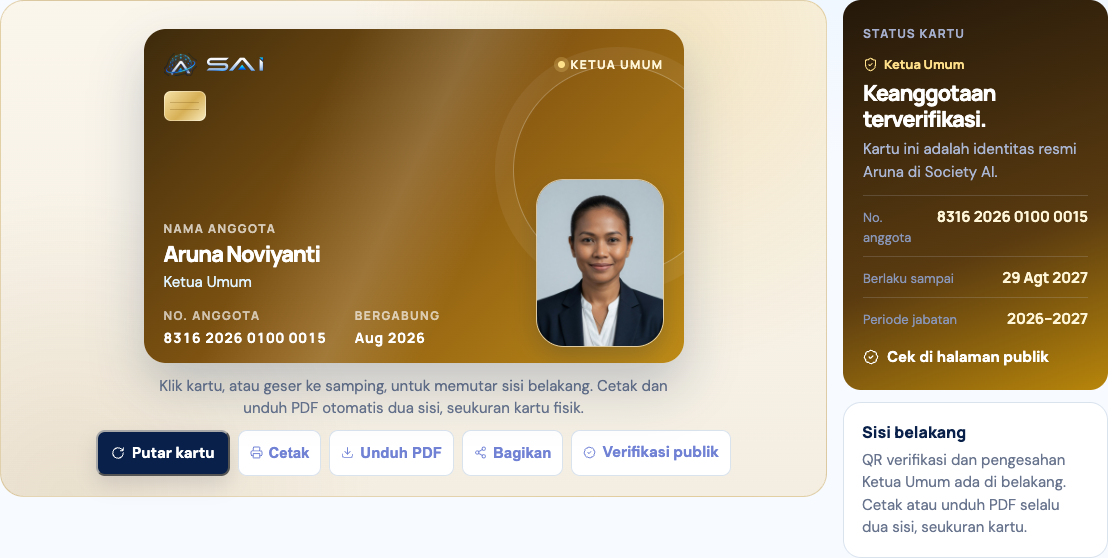
- Flip the card to see the back, including the signature and QR code.
- Print and Download PDF produce a two-sided file ready to print (active members only).
- Share sends the official verification link.
- Public verification opens a page that institutions and the public can check.
The card display follows the organization role: Member, Officer, or Chair.